When rankings drop or fresh content goes unindexed, site owners usually want an instant fix.
For years, search marketers assumed that requesting a URL re-index in Google Search Console would trigger immediate algorithmic updates. However, new technical guidance directly from Google confirms that technical site recovery and content processing operate on widely varied, multi-tiered timelines.
A simple site layout tweak might process in hours, while site-wide structural recoveries or major algorithm updates can take several weeks or even months to reflect in active SERPs.
Understanding these realistic processing cycles allows SEO managers to set accurate expectations, manage stakeholders, and avoid unnecessary technical changes. Here is a breakdown of Google’s real-world re-crawling and re-indexing processing ranges.
The Reality of Google Indexing: Real-World Recovery Ranges
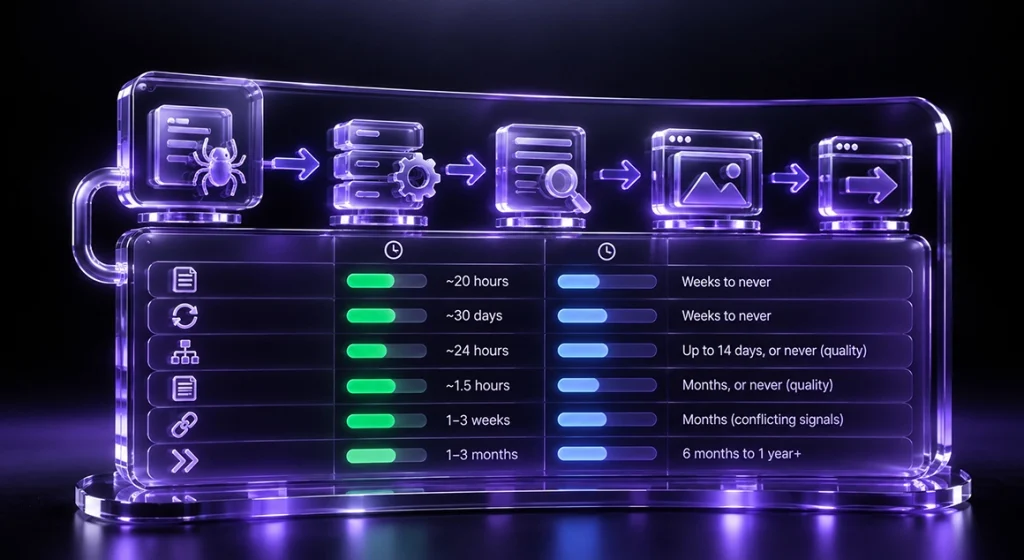
Google’s automated systems don’t treat all technical site changes equally. How long changes take to appear in active search results depends heavily on structural depth and overall site health.
| Update Category | Scope of Change | Expected Timeline Range |
| URL-Level Fixes | Individual title tag updates, broken link fixes, or single page redirects. | A few hours to a few days. |
| Page-Level Technical Updates | Canonical updates, structured data fixes, or layout shifts across a directory. | Several days to a few weeks. |
| Site-Wide Quality Recoveries | Recovering from site-wide spam updates, core updates, or major migrations. | Weeks to several months. |
Understanding how Google indexing operates across these operational tiers prevents site managers from reverting valid technical fixes prematurely.
3 Core Factors Dictating Processing Timelines
Google doesn’t crawl the entire web at a uniform speed. Several technical variables dictate how quickly your site is re-evaluated:
1. Crawl Frequency and Site Authority
Popular, frequently updated sites get crawled by Google multiple times an hour. Smaller sites, on the other hand, get crawled less frequently because they don’t update their content often.
2. Crawl Budget Efficiency
Crawl budget means the total number of URLs that Googlebot wishes to crawl from your website. Slow server speeds, parameter loops, and orphaned pages use up resources and delay new updates.
3. Structural Site Depth
Updates to the homepage and other key category pages will be indexed promptly. Deeper pages in your site’s structure may take a bit longer to index.
Aligning your technical infrastructure with a disciplined search engine optimization strategy ensures crawlers navigate your site efficiently and discover content without delay.
Actionable Steps to Accelerate Search Engine Processing
Though you cannot make Google update its index right away, carrying out these technical best practices will help process faster on all webpages:
- Optimize Server Response: Shorten server response times (TTFB) to enable Googlebot to render pages without running into server timeouts or rate limiting.
- Utilize Google Search Console: Use the URL inspection tool in Google Search Console to prioritize re-crawling time-bound single pages.
- Update XML Sitemaps: Keep your XML sitemaps up to date. Use only canonical URLs and send these pages for crawling via your dashboard.
Tracking Google indexing time across key template types helps technical teams establish baseline processing metrics for future migrations and updates.
Brands expanding multi-channel search presence can also pair site technical optimization with an enterprise influencer marketing platform to streamline creative production and drive off-page engagement signals.
The Verdict: Patience Beats Panic in Search Engine Optimization
Technical recoveries require consistency and patience.
Google crawl schedules are subject to change. This is common when search engines process large volumes of web data. Instead of making frequent, panic-driven changes in a matter of days, focus on building a strong architecture and maintaining fast response times.
Allowing search crawlers enough time to re-evaluate your site ensures your technical improvements show up in organic Search Results.
Frequently Asked Questions
For established sites with clean technical setups, Google indexing time ranges from a few minutes to a few days. Newer websites or unoptimized URLs may take several weeks to be fully indexed.
Crawl Budget means the number of pages crawled by Googlebot on your site during a certain time. Proper use of crawl budget lets search engine spiders crawl the pages that matter most to your site.
The URL Inspection tool in Google Search Console lets webmasters request priority crawling for specific pages, speeding up discovery of updated or newly published content.
Site-wide recoveries require Googlebot to re-crawl and re-evaluate a significant portion of your domain’s pages, which inherently takes longer than updating a single URL.
If a server returns 5xx errors or experiences extreme latency, Googlebot automatically reduces its crawl speed to avoid overloading the site, delaying overall content discovery.